
Deposits, customisable menus – oh my! Ovivio has been busy. We’ve been hard at work this month to deliver new and improved features. Check out our latest releases to help take your nursery business forward!
Deposits
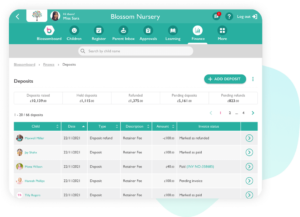
Deposits are here! Easily manage your deposits all in one place. Customers with the Finance package will find Deposits under the finance tab on the menu bar. The overview will give you a breakdown of deposits raised, held deposits, deposits refunded, pending deposits and pending refunds.
Menu Item Diary Settings
Want to manage your menu? We hear you! We’ve added a new area in settings where meal items and snack items can be added, edited and archived.
Updated Financial Reports terminology
You may notice some changes to the financial reports. They still display the same information, but the wording has been tweaked slightly.
- Total invoiced amount is now Fee income.
- Fees is now Sessions.
- Two rows have also been added: Deposit & deposit refund. Please note: These amounts are not included in the total income however they are included in the total outstanding.
Curious for an Ovivio Tour?
If you’d like to learn more about how Ovivio can help manage your Early Years setting, why not book your 1-2-1 demo?